In today’s digital era, a high-speed internet connection is no longer an optional luxury; it is as fundamental as electricity or running water. Whether you are a full-time university student attending live lectures in San Francisco, a researcher downloading massive datasets in Washington, a remote professional collaborating across corporate offices in New York, a multi-generational household streaming 4K media in California, or a student managing hybrid classes in Texas, finding a reliable and budget-friendly broadband connection is essential.
However, navigating the telecom landscape can feel overwhelming. Internet Service Providers (ISPs) often bombard consumers with confusing terminology, promotional teaser rates that skyrocket after twelve months, hidden equipment fees, and complicated bandwidth tiers. If you balance intensive online learning—such as live Zoom lectures, proctored exams, and cloud-based file collaboration—with heavy video streaming (Netflix, YouTube, Twitch, or 4K media), choosing the wrong plan results in endless buffering, dropped connections, and wasted money.
This comprehensive, highly informative guide provides the framework, technical benchmarks, and actionable strategies needed to select the ideal affordable high-speed internet plan for your household.
1. Understanding Internet Speeds: What Do You Actually Need?
Before evaluating providers or pricing tiers, you must understand what internet speeds mean in practical terms. Speed is measured in Megabits per second (Mbps) and is divided into two distinct metrics: Download speed and Upload speed.
Download vs. Upload Speed
- Download Speed: Determines how quickly data travels from the internet to your device. This dictates how fast web pages load, how smoothly 4K movies stream, and how quickly you can download large textbook PDFs or software packages.
- Upload Speed: Dictates how fast data travels from your device to the internet. Crucial for online learning, upload speed governs the quality of your video feed during live Zoom or Microsoft Teams classes, your voice clarity in study groups, and how fast you can upload large homework assignments to cloud repositories.
The Modern Benchmark: The FCC Standard
According to contemporary benchmarks established by regulatory bodies like the Federal Communications Commission (FCC), a baseline broadband connection should deliver a minimum of 100 Mbps download and 20 Mbps upload. However, for households combining online education and heavy video streaming, this baseline is often just a starting point.
2. Bandwidth Requirements for Learners and Streamers
To choose an affordable plan without overpaying for excessive speed you will never use, calculate your household’s simultaneous data load using the following breakdown:
- Basic Browsing, Email, and LMS (Canvas/Blackboard): ~5–10 Mbps per user.
- HD Video Conferencing (Zoom/Teams Classes): ~10–15 Mbps download and 5–10 Mbps upload per active participant.
- HD Video Streaming (1080p Netflix/YouTube): ~5–10 Mbps per active screen.
- Ultra HD (4K) Video Streaming: ~25 Mbps per active screen.
Household Tiers
- Single User / Student Living Alone: A 100 Mbps to 200 Mbps plan handles simultaneous 4K streaming, heavy web research, and live video lectures without breaking a sweat.
- Shared Apartments / Families (2–4 Users): If multiple people are streaming video, gaming, or attending online classes at the same time, look for plans in the 300 Mbps to 500 Mbps range.
- Power Users / Large Households (5+ Users): Households running heavy multi-device cloud backups, competitive gaming, and simultaneous 4K streams benefit from Gigabit (1,000 Mbps+) infrastructure, provided it fits the budget.
3. Comparing Connection Technologies: Fiber, Cable, 5G, and DSL
The underlying technology delivering your internet signal plays a massive role in reliability, latency (ping), and pricing consistency.
| Connection Type | Typical Speed Range | Pros | Cons | Best Suited For |
| Fiber-Optic (FTTH) | 300 Mbps to 5,000+ Mbps | Symmetrical upload/download speeds, ultra-low latency, highly reliable | Availability can be limited in older neighborhoods | Heavy upload tasks, live classes, competitive gaming, future-proofing |
| Cable (Coaxial) | 100 Mbps to 1,200+ Mbps | Widely available across urban and suburban markets, high download speeds | Asymmetrical speeds (slow uploads), network congestion during peak hours | General streaming, moderate online learning, everyday households |
| Fixed Wireless (5G Home) | 50 Mbps to 300+ Mbps | No-contract flexibility, instant self-setup, highly competitive flat pricing | Signal interference from walls/distance, variable speeds during peak hours | Budget-conscious students, renters, temporary housing |
| DSL (Copper Phone Lines) | 10 to 100 Mbps | Available in remote or rural pockets | Severely outdated speeds, high latency, being phased out | Basic web browsing where no other options exist |
4. Uncovering Hidden Costs and Financial Pitfalls
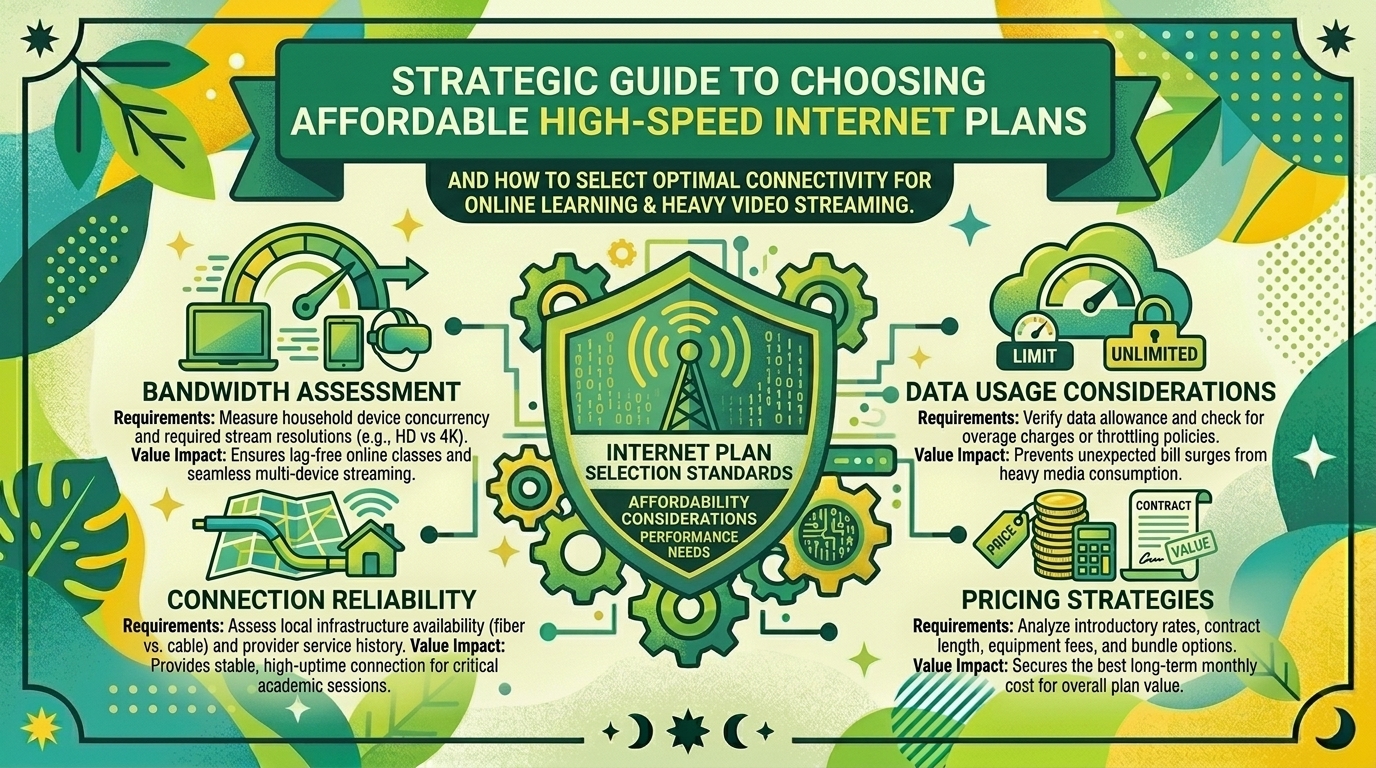
Affordability is about more than just the headline monthly price. Many budget-friendly plans carry hidden fees that inflate your bill. Always check for the following cost factors before signing up:
- Promotional Rate Expirations: ISPs love advertising alluring rates like “$30/month,” but check the fine print to see if that price jumps by $20 to $40 after 12 months. Look for providers offering true lifetime pricing or no-contract flexibility.
- Equipment Rental Fees: Many companies charge $10 to $18 per month just to rent their Wi-Fi router/modem gateway. Purchasing your own compatible modem and router often pays for itself within a single academic year.
- Data Caps and Overage Charges: Some cable and satellite providers impose monthly data limits (e.g., 1.2 Terabytes). If your household streams heavy 4K video and downloads massive educational files, you could hit data caps and face steep penalty fees. Prioritize plans with unlimited data.
- Activation and Installation Fees: Watch out for one-time setup charges. Many modern 5G home internet and fiber providers offer free self-install kits shipped directly to your door.
5. Assistance Programs and Student Discounts
If you are a student or lower-income household, you may qualify for discounted rates or state-backed digital equity programs that significantly lower monthly internet expenditures. Always ask customer support or check municipal portals for low-income broadband initiatives, student-exclusive promotional codes, or academic bundle pricing.
Step-by-Step Guide to Selecting Your Plan
- Map Your Local Availability: Enter your ZIP code on broadband comparison tools to see which ISPs actually service your specific building or neighborhood.
- Audit Your Bandwidth Needs: Count the number of devices and simultaneous users in your home during peak evening hours.
- Prioritize Upload Speeds for School: If your major requires video editing, architecture rendering, or heavy cloud syncing, lean toward Fiber or high-tier Cable to secure robust upload speeds.
- Scrutinize the Contract: Look for contract-free, month-to-month plans that allow you to cancel or downgrade without penalty when your lease ends or the semester concludes.
10 Frequently Asked Questions (FAQs)
1. Is 100 Mbps enough for online learning and streaming?
Yes. A 100 Mbps download speed easily supports multiple simultaneous users streaming high-definition video, participating in Zoom classes, and browsing web research concurrently.
2. What is the difference between megabits (Mbps) and megabytes (MB/s)?
Megabits (Mbps, with a lowercase ‘b’) measure network data transfer speed, whereas Megabytes (MB/s, with a uppercase ‘B’) measure file storage size. Internet speeds are always advertised in megabits. To find out how fast a file downloads in megabytes, divide your download speed by eight.
3. Why is my actual Wi-Fi speed slower than what I pay for?
Wi-Fi signal degradation is caused by physical obstacles (walls, heavy furniture, metal appliances), distance from the router, and network congestion on shared channels. Testing your speed via an Ethernet cable plugged directly into the router reveals your true ISP delivery speed.
4. Do I need fiber-optic internet for remote classes?
While not strictly mandatory, fiber internet is ideal for online learning because it offers symmetrical speeds (meaning your upload speed matches your download speed), eliminating lag and pixelation during live video presentations and proctored exams.
5. Are 5G home internet plans reliable enough for university students?
Yes, 5G home internet provided by major cellular carriers is increasingly reliable in metropolitan areas. However, because signal performance depends on your proximity to local cell towers, test the connection during peak evening hours to ensure stability.
6. Should I rent my router or buy my own?
Buying your own modem and Wi-Fi router almost always saves money over time, eliminating monthly rental fees while offering better hardware performance and stronger wireless coverage for your dorm or apartment.
7. What is data throttling, and how do I avoid it?
Data throttling occurs when an ISP intentionally slows down your internet speed after you exceed a specific monthly data threshold. You can avoid this by selecting plans explicitly marketed with unlimited data and no soft caps.
8. How can I lower my internet bill if I’m on a tight budget?
Call your current provider before your promotional contract expires, mention competitor pricing in your area, and ask to be transferred to the retention department to request a promotional rate extension. Alternatively, switch to a low-cost prepaid or 5G home internet provider.
9. Does online gaming or video streaming use more bandwidth?
4K Ultra HD video streaming typically consumes significantly more bandwidth than online gaming. While streaming 4K video requires a steady 25 Mbps stream continuously, online multiplayer games usually require less than 5 Mbps, though they demand low latency (ping).
10. What should I do if my internet connection drops during an online exam?
Immediately notify your professor or university IT department via your mobile phone hotspot. Document the outage with a timestamped speed test screenshot so you have proof of technical failure for academic appeals or make-up exam requests.
Conclusion
Choosing an affordable high-speed internet plan doesn’t have to be a stressful chore. By accurately assessing your household’s digital footprint, understanding the technical differences between fiber, cable, and 5G connections, and carefully screening providers for hidden equipment fees or data caps, you can secure a lightning-fast connection that protects your wallet.
Leave a Reply