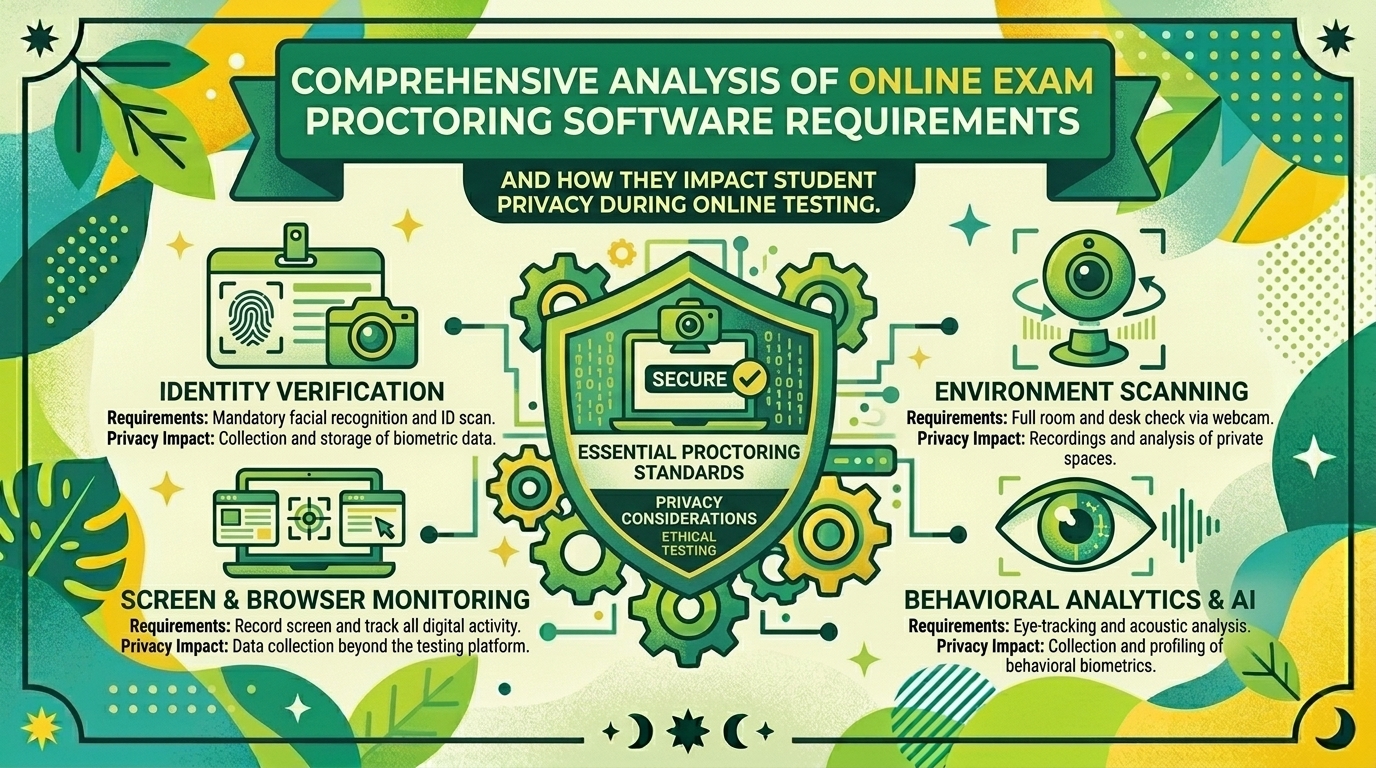
Comprehensive Analysis of Online Exam Proctoring Software Requirements and How They Impact Student Privacy During Online Testing
Introduction
The digital transformation of higher education has fundamentally redefined how academic assessments are delivered. Educational institutions across major academic hubs—from research universities in Texas and urban campuses in New York, to tech-forward institutions in California, public systems in Washington, and innovative learning centers in San Francisco—rely heavily on remote testing infrastructures.
To uphold academic integrity without requiring physical presence, universities rapidly adopted online exam proctoring software. These digital platforms promise a secure, scalable method for invigilating remote exams. However, this shift has ignited a massive debate surrounding technical requirements, institutional oversight, and civil liberties. By combining automated artificial intelligence (AI) with continuous biometric and environmental surveillance, modern proctoring tools touch directly upon delicate student privacy rights.
This comprehensive analysis examines the core system requirements of online exam proctoring software, evaluates how these technical parameters interact with student data privacy, and outlines vital strategies for balancing academic honesty with personal rights.
The Technical Architecture of Remote Exam Proctoring
To understand the privacy implications of proctoring software, one must first dissect what these applications actually do under the hood. Modern proctoring suites generally fall into three operational categories:
- Live Remote Proctoring: A human proctor monitors a student via webcam and microphone in real time, often utilizing screen-sharing capabilities to watch desktop activity.
- Automated AI-Driven Proctoring: Algorithms monitor the student throughout the exam session, flagging “suspicious” behavioral patterns (such as looking away from the screen, movement, or background audio) for later administrative review.
- Recorded (Asynchronous) Proctoring: The system records the entire session (webcam, microphone, and desktop screen) and stores it on cloud servers for post-exam algorithmic scanning and instructor review.
Core System and Software Requirements
To function seamlessly, proctoring tools demand extensive hardware and software permissions from the user’s personal computer:
- Browser Lockdown Capabilities: Software or extensions that disable copy-paste functions, block opening new tabs or external applications, and restrict system keyboard shortcuts.
- Biometric & Facial Recognition: Continuous scanning of facial geometry to verify student identity against university records and ensure the same test-taker remains present.
- Environmental & Room Scans: Requiring students to pan their webcams 360 degrees across their private bedrooms, desks, and living spaces to check for unauthorized study materials.
- Deep System Monitoring: Tracking keystroke speeds, mouse dynamics, active background processes, secondary monitors, and network routing logs.
The Core Privacy Concerns and Civil Liberties Challenges
When surveillance moves out of the neutral territory of a campus classroom and directly into a student’s private home, profound legal and ethical boundaries are crossed.
1. The Invasion of the Domestic Space
Requiring students to expose their private bedrooms, family living arrangements, or shared apartments via room scans and continuous webcam feeds strips away basic personal boundaries. Landmark legal challenges—such as federal court rulings questioning the constitutionality of remote room scans under Fourth Amendment principles—highlight growing judicial pushback against invasive home surveillance. For lower-income students, international students living in cramped conditions, or housing-insecure individuals, exposing their living quarters introduces immense psychological stress and socio-economic exposure.
2. Biometric Data Harvesting and Retention
Proctoring tools collect highly sensitive biometric markers, including facial geometries, voiceprints, and behavioral telemetry (keystroke rhythms and eye-tracking patterns).
- Data Ownership Risks: Students rarely control where this data is stored, how long third-party vendors retain it, or whether anonymized biometric logs are repurposed to train proprietary machine-learning models.
- Data Breach Exposure: As centralized targets for cyberattacks, third-party EdTech vendors holding vast repositories of student biometric and identity documents represent major data security liabilities.
3. Algorithmic Bias and False Positives
Automated AI proctoring relies on behavioral analytics to flag “cheating.” However, these algorithms frequently misinterpret normal human behavior—particularly for neurodivergent students, individuals with physical disabilities, or international test-takers:
- Neurodiversity & Physical Health: Students with ADHD, autism, dyslexia, or chronic pain may fidget, look away from the screen to concentrate, or read exam questions aloud. These completely normal coping mechanisms frequently trigger automated “suspicion” flags.
- Racial Bias in Facial Recognition: Studies consistently demonstrate that facial recognition models exhibit higher error rates when processing darker skin tones, often due to poor home lighting or algorithmic training gaps, leading to discriminatory accusations against students of color.
Regulatory Frameworks: Protecting Student Data
Educational institutions and proctoring vendors operating in the United States and internationally are bound by strict statutory frameworks governing data privacy:
- FERPA (Family Educational Rights and Privacy Act): In the US, proctoring vendors are legally classified as “school officials” under FERPA. This means they are strictly prohibited from selling student data, using exam telemetry for commercial marketing, or sharing records with unauthorized entities. Institutions retain legal ownership of all collected data.
- GDPR (General Data Protection Regulation): For students studying in European institutions or dual-citizens abroad, GDPR mandates explicit consent, data minimization (collecting only what is necessary), and the right to erasure. European data protection authorities have increasingly penalized high-risk automated proctoring due to its invasive nature.
- State-Level Privacy Laws: Emerging legislation across states like California and Washington places heavy compliance burdens on educational software providers regarding biometric data collection, mandatory opt-outs, and secure deletion timelines.
Comparative Analysis: Proctoring Models vs. Privacy Impact
| Proctoring Method | Surveillance Level | Privacy Risk Profile | Primary Vulnerabilities | Best Mitigation Strategy |
| Fully Automated AI | High (Continuous eye, audio, and video tracking) | Severe | High false-positive rates; biometric profiling; algorithmic bias against neurodivergent/minority students | Strict human-in-the-loop review before any academic penalty is assessed. |
| Live Human Proctoring | Moderate-High (Real-time video and desktop view) | Moderate | Direct human observation of domestic living spaces; potential for subjective bias by proctors. | Restrict camera angles to focus solely on the user’s face; prohibit entire room scans. |
| Secure Browser Only | Low (Locks down local device applications) | Low-Minimal | Blocks local file access but does not record webcam video or audio. | Preferred for low-stakes testing; zero biometric harvesting required. |
| Open-Book / Alternative Assessment | None | Zero | Requires shift away from traditional multiple-choice testing toward analytical projects. | Redesigning curricula for authentic, project-based assessment. |
Actionable Best Practices for Students and Institutions
To mitigate privacy violations while preserving academic integrity, institutions and students should adopt balanced, privacy-first protocols:
- Adopt Data Minimization Principles: Universities should mandate that proctoring tools record only the bare minimum required for identity verification, avoiding full room scans and disabling continuous audio recording when unnecessary.
- Prioritize Browser-Based, Zero-Install Solutions: Avoid applications that require deep kernel-level software installations (which function similarly to spyware). Prefer lightweight, browser-sandboxed extensions that vanish or deactivate immediately post-exam.
- Mandatory Human-in-the-Loop Review: Automated AI flags must never result in automatic academic discipline. Every flagged anomaly must be vetted by human instructors who understand individual student accommodations.
- Provide Privacy-Preserving Alternatives: Institutions must offer equitable alternative testing environments (such as testing on campus in a private university room) for students who object to installing surveillance software in their private homes.
10 Frequently Asked Questions (FAQs)
1. Can my university legally force me to use webcam proctoring software?
Yes, universities generally possess the institutional authority to determine assessment methods. However, legal challenges (such as rulings against unconstitutional room scans) mean schools must offer reasonable alternatives or ensure their vendors comply strictly with state and federal privacy laws.
2. What happens to my biometric video and audio data after the exam is graded?
Under FERPA guidelines and vendor contracts, data should be securely deleted after a designated retention window (typically 30 to 60 days, or following the grade appeal period). Students have the right to request confirmation of data deletion from their institution.
3. Are mandatory 360-degree room scans legal?
Legal precedent has increasingly challenged room scans as an unreasonable search under the Fourth Amendment. Many forward-thinking institutions are eliminating room scans, opting instead for virtual backgrounds or focusing strictly on head-and-shoulder webcam feeds.
4. How can I protect my privacy if my professor requires AI proctoring?
Use a neutral, uncluttered background or a virtual background if permitted by the software. Close all unrelated personal applications, documents, and browser tabs before launching the secure session to prevent accidental exposure of private data.
5. What should I do if I am falsely accused of cheating by an AI proctoring algorithm?
Do not panic. Request the full audit log, AI confidence score, and timestamped video evidence from your instructor. Document any technical anomalies, environmental distractions, or medical accommodations, and file a formal appeal through your university’s academic grievance process.
6. Do proctoring companies sell or monetize student data?
Legitimate enterprise vendors bound by FERPA and GDPR are contractually prohibited from selling student data or using exam recordings to train commercial AI models. Always review the specific privacy policy of the vendor utilized by your school.
7. Why do automated proctoring tools frequently flag neurodivergent students?
Algorithms are programmed to look for rigid “norms” of behavior—such as steady eye contact and stillness. Students with ADHD, autism, or processing disorders who look away to think or fidget naturally are disproportionately flagged by these rigid parameters.
8. Can I opt out of remote proctoring due to religious or cultural reasons?
Many universities provide alternative accommodations for students with religious, cultural, or privacy objections. This often includes taking the exam physically on campus or under the direct supervision of an instructor.
9. What is the difference between a secure lockdown browser and full AI proctoring?
A secure lockdown browser restricts what you can open on your computer during an exam (blocking Google, messaging apps, and screen grabs) without recording your face or room. Full AI proctoring adds continuous webcam, microphone, and biometric behavioral surveillance.
10. How can universities move away from invasive proctoring altogether?
Many academic departments are shifting toward authentic assessment models—such as open-book conceptual exams, oral defenses, timed project submissions, and randomized question banks—which naturally neutralize the incentive and opportunity for academic dishonesty without invasive surveillance.
Conclusion
The deployment of online exam proctoring software represents one of the most contentious intersections of educational technology and civil liberties. While universities across San Francisco, New York, California, Texas, and Washington face legitimate pressures to preserve academic standards in digital environments, this goal must not come at the expense of student dignity and data privacy.
Leave a Reply