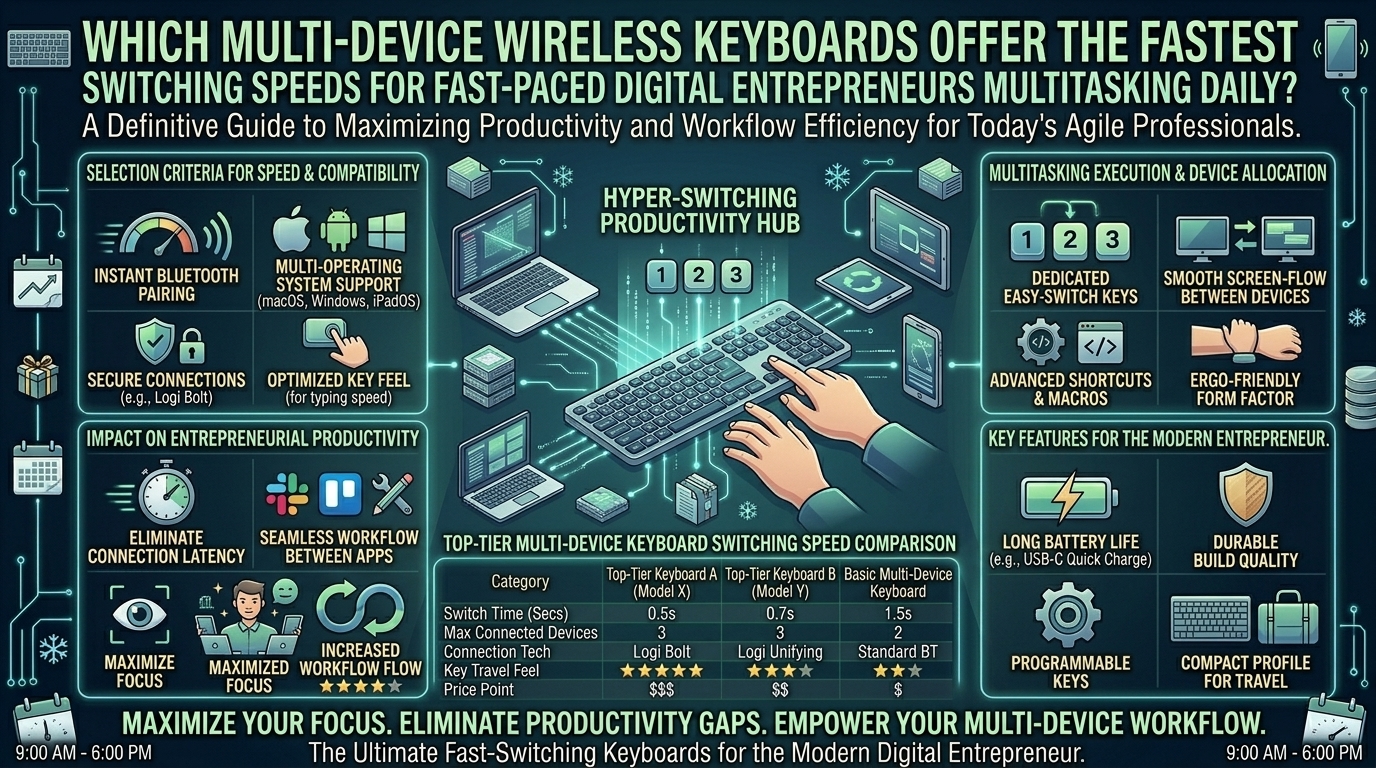
For today’s digital entrepreneurs, venture founders, and remote executives navigating demanding multi-platform workflows, hardware latency is more than an annoyance—it is a direct drain on productivity. Whether you are managing a tech startup in San Francisco, overseeing operations across corporate hubs in New York, coordinating distributed teams in Washington and California, or monitoring investments in Texas, your workday is defined by constant context switching.
You might be drafting an urgent financial model on a primary Windows desktop, responding to real-time client feedback on a MacBook Pro, and verifying deployment logs on a Linux test machine or mobile iPad. Juggling these environments requires more than just a standard keyboard; it demands a high-performance multi-device wireless keyboard capable of hopping between machines instantly without dropped packets, stuttering keystrokes, or frustrating Bluetooth handshaking lags.
This comprehensive guide evaluates the core metrics, connection protocols, hardware topologies, and leading models designed to deliver the absolute fastest switching speeds for fast-paced digital entrepreneurs.
1. Understanding Switching Latency: Bluetooth vs. Dedicated 2.4GHz RF
When evaluating how fast a keyboard can jump from Device A to Device B, understanding the underlying transmission protocols is essential. Not all wireless connections are built equal.
+--------------------+-------------------------+------------------------+-------------------------+
| Connection Type    | Typical Switch Speed    | Multi-Host Capacity    | Stability Profile       |
+--------------------+-------------------------+------------------------+-------------------------+
| Standard Bluetooth | 2.5 to 4.5 seconds      | Up to 3 devices        | Prone to local Wi-Fi RF |
| Bluetooth 5.2+     | 1.5 to 2.5 seconds      | Up to 3-4 devices      | High energy efficiency  |
| Proprietary 2.4GHz | Instant (via switch)    | Requires multiple dongles| Flawless zero-latency  |
+--------------------+-------------------------+------------------------+-------------------------+
The Bluetooth Handshake Bottleneck
Most multi-device keyboards utilize standard Bluetooth profiles (Bluetooth 3.0 or 5.x) to pair with multiple hosts. When you press a device selection key (e.g., Fn + 1 or a dedicated hardware toggle), the keyboard must disconnect its active radio frequency session, re-authenticate cryptographic handshakes, and establish a new stream with the target host. This process inherently introduces a lag window ranging from 2 to 4 seconds—an eternity when you are rapidly cross-referencing text between screens.
Software-Aided Acceleration (Logitech Flow & Ecosystem Solutions)
To bypass physical key-press delays, advanced software solutions like Logitech Flow synchronize keyboard and mouse transitions seamlessly. By pairing a high-end multi-device keyboard (such as the Logitech MX Keys S) with a matching ecosystem mouse, the cursor crossing a monitor screen edge triggers an instantaneous hardware transition. This drops perceived switching time down to under 1.5 seconds, or completely eliminates manual keystrokes altogether.
2. Key Hardware Features High-Speed Multi-Device Users Must Prioritize
To secure a fluid multi-machine setup, evaluate prospective keyboards against these core criteria:
- Dedicated Physical Switch Keys: Avoid keyboards that bury device switching deep inside secondary function layers or require complex multi-key chords. Look for distinct, tactile buttons or toggle switches located prominently on the chassis.
- Tri-Mode Connectivity: The most versatile units offer Tri-Mode flexibility—supporting multiple Bluetooth profiles, a dedicated 2.4GHz USB wireless dongle, and a wired USB-C option. Using the 2.4GHz dongle for your primary workstation while reserving Bluetooth slots for mobile devices yields the fastest performance on your main rig.
- OS-Agnostic Layout Mapping: Entrepreneurs frequently jump between macOS and Windows environments. A top-tier multi-device keyboard features hardware switches or automatic OS detection that remaps modifier keys (
Cmd/CtrlandAlt/Option) instantaneously without manual software reconfiguration.
3. Top-Performing Multi-Device Keyboards for Fast-Paced Workflows
A. Logitech MX Keys S — The Productivity Benchmark
Widely regarded as the industry standard for multi-device coordination, the MX Keys S is purpose-built for professionals managing heavy administrative and creative loads.
- Switching Speed: Average 1.4 seconds using physical toggle keys, or virtually instantaneous when paired with Logitech Flow software.
- Capacity: Supports up to 3 distinct devices across Windows, macOS, Linux, iOS, and Android.
- Advantage: Exceptional scissor-switch tactile stability, smart illumination backlighting, and fluid multi-computer file sharing when bundled with an MX Master mouse.
B. Keychron K3 Pro / K2 Pro — The Mechanical Choice
For entrepreneurs who prefer tactile, mechanical key switches over low-profile scissor keys without sacrificing multi-device mobility, Keychron’s Pro line delivers.
- Switching Speed: Average 3.0 to 3.5 seconds via Bluetooth device hotkeys.
- Capacity: Up to 3 connected Bluetooth hosts plus a wired USB-C mode.
- Advantage: Fully hot-swappable mechanical switches, QMK/VIA firmware custom programmability, and native switch toggles for Mac and Windows layouts.
C. Razer Pro Type Ultra — The Silent Powerhouse
Designed for professional office environments, this board combines a cushioned ergonomic wrist rest with multi-host wireless capability.
- Switching Speed: Average 3.5 seconds across paired Bluetooth profiles.
- Capacity: 3 Bluetooth channels plus a lag-free 2.4GHz USB receiver.
- Advantage: Ultra-quiet linear mechanical switches engineered to keep conference calls free of loud clacking noises.
4. Optimization Tips for Zero-Lag Multi-Device Typing
- Minimize 2.4GHz Interference: Keep your wireless USB receivers away from USB 3.0/4.0 ports and external hard drives, which emit electromagnetic interference that degrades Bluetooth and RF signal stability.
- Prioritize Wired/Dongle for Primary Rigs: Always assign your primary, high-workload desktop to a dedicated 2.4GHz USB dongle or wired connection, reserving slower Bluetooth channels for secondary tablets or phones.
- Keep Firmware Updated: Manufacturers regularly release firmware patches that optimize radio frequency power management and reduce Bluetooth handshake latency.
5. Comprehensive Frequently Asked Questions (FAQ)
1. What causes a delay when switching between devices on a wireless keyboard?
The delay is primarily caused by the Bluetooth reconnection handshake. When you switch devices, the keyboard’s internal controller must break its active radio frequency link, re-authenticate security keys, and establish a new data stream with the target computer, which takes a few seconds.
2. Can a wireless keyboard connect to a Windows PC and a Mac simultaneously?
Yes. Multi-device keyboards are engineered to be OS-agnostic. You can pair channel 1 to a Windows desktop, channel 2 to a MacBook Pro, and channel 3 to an iPad, switching between them with a simple keystroke or toggle switch.
3. What is “Logitech Flow,” and how does it speed up multi-device workflows?
Logitech Flow is software that links a compatible keyboard and mouse across multiple computers on the same local network. Instead of pressing buttons to switch devices, moving your mouse cursor to the edge of one screen automatically switches both the mouse and keyboard to the adjacent computer.
4. Are mechanical keyboards slower at multi-device switching than membrane keyboards?
Not inherently. Switching speed is determined by the wireless chipset and firmware, not the physical switch mechanism underneath the keycaps. However, many gaming-focused mechanical keyboards prioritize ultra-low latency single-device 2.4GHz connections over multi-host Bluetooth features.
5. How many devices can a typical multi-device keyboard handle?
Most standard productivity keyboards support up to 3 connected devices. Some specialized enterprise models or custom-firmware boards can expand this capability, but three remains the optimal balance for usability and quick switching.
6. Does using Bluetooth drain the keyboard battery faster than a USB dongle?
Generally, yes. Maintaining active multi-host Bluetooth pairings consumes slightly more standby power than a dedicated 2.4GHz proprietary receiver, though modern keyboards still yield weeks or months of battery life per charge.
7. Can I use a multi-device keyboard while it is plugged into a USB-C charging cable?
Yes. On almost all modern wireless keyboards, plugging in a USB-C cable establishes a direct wired data connection while simultaneously charging the internal lithium-ion battery.
8. Why does my keyboard occasionally lag or drop keystrokes during a switch?
Interference from nearby routers, Wi-Fi access points, or crowded USB 3.0 ports can disrupt Bluetooth signals. Ensuring your keyboard is updated and moving wireless dongles away from metal desk frames resolves most dropped keystrokes.
9. Do I need special software installed on all my computers to use a multi-device keyboard?
No. Basic multi-device switching works entirely through hardware buttons without any software installed. However, companion software (such as Logitech Options+ or Razer Synapse) is often required to unlock advanced macro programming and cursor-sharing features.
10. Which connection type should I use for competitive typing or fast data entry?
For your primary workstation where speed and zero latency matter most, use a dedicated 2.4GHz USB wireless dongle or a wired connection. Reserve Bluetooth exclusively for secondary mobile devices and tablets where instantaneous response times are less critical.
Conclusion
For digital entrepreneurs balancing high-velocity operations across San Francisco, New York, Washington, Texas, and California, eliminating friction in your daily hardware stack yields compounding productivity gains. By selecting a high-performance multi-device keyboard equipped with dedicated switching controls, robust tri-mode connectivity, and optimized software integration, you can banish connection lag and move effortlessly across your digital ecosystem.
Leave a Reply