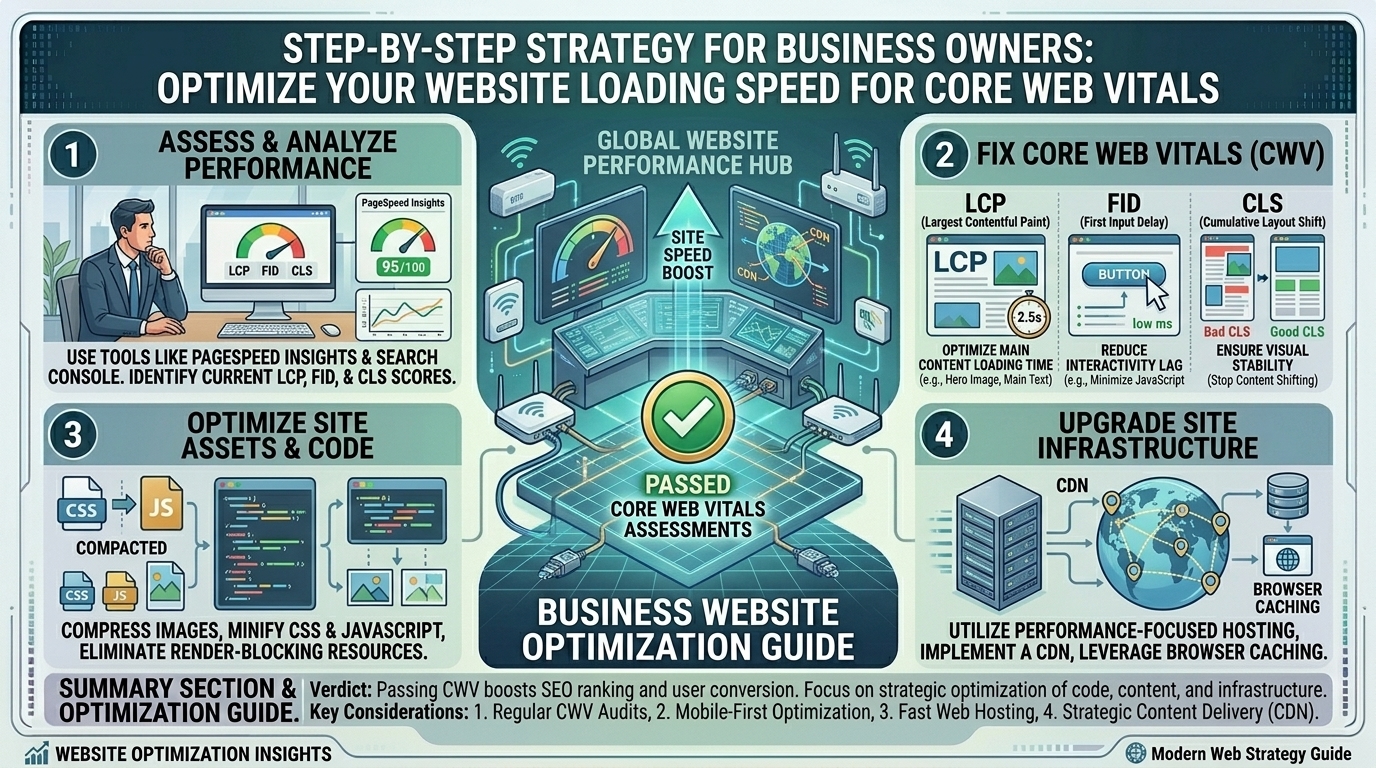
How Business Owners Can Optimize Their Company Website Loading Speed to Pass Core Web Vitals Assessments
By: The Editorial Team at rauzn.com (Serving growing enterprises, digital agencies, and tech innovators across Texas, New York, California, Washington, and San Francisco)
Introduction: The Hidden Business Cost of a Slow Website
For modern business owners and marketing directors—whether operating an e-commerce storefront in New York, a SaaS platform in San Francisco, a boutique agency in Texas, or a corporate enterprise in Washington—your company website is your primary digital storefront. Yet, millions of dollars in marketing acquisition budgets are quietly wasted every month because of a single, invisible killer: sluggish page loading speeds.
In the digital landscape, consumer patience has evaporated. If a prospective client clicks your Google search link and your landing page takes longer than three seconds to render interactive content, they bounce straight back to your competitor.
Google knows this. That is why search engine algorithms place heavy weight on Core Web Vitals (CWV)—a set of standardized, user-centric metrics that measure real-world user experience regarding loading performance, visual stability, and interactivity. Passing these assessments is no longer just an optional task for backend developers; it is an urgent business imperative for search visibility and conversion optimization.
Below is an exhaustive, enterprise-grade technical guide detailing how business owners can diagnose, optimize, and future-proof their web infrastructure to seamlessly pass Google’s Core Web Vitals assessments.
1. Demystifying Core Web Vitals: The Three Pillars of User Experience
Google’s Core Web Vitals focus on three specific dimensions of web usability. To optimize your site effectively, you must understand what each metric measures and why it matters to your bottom line.
A. Largest Contentful Paint (LCP) — Loading Performance
- What it measures: How long it takes for the primary, largest piece of content visible in the user’s viewport (such as a hero image, a main video banner, or a massive heading block) to fully render on screen.
- The Passing Threshold: An LCP of 2.5 seconds or faster is required for a “Good” rating. Anything above 4.0 seconds is classified as “Poor.”
- Business Impact: Slow LCP directly kills conversion rates. Users perceive slow-loading pages as untrustworthy or broken.
B. Interaction to Next Paint (INP) — Responsiveness
- What it measures: The latency of all interactions a user has with the page (such as clicking a menu button, adding an item to a shopping cart, or submitting a contact form) from the moment they click until the browser paints the next visual frame. (Note: INP officially replaced First Input Delay as a core metric).
- The Passing Threshold: An INP of 200 milliseconds or less is considered “Good.”
- Business Impact: If a user taps a “Book a Demo” button and the page freezes or lags before responding, frustration spikes, leading to immediate cart or form abandonment.
C. Cumulative Layout Shift (CLS) — Visual Stability
- What it measures: The amount of unexpected movement of visible layout elements while the page is still loading. Have you ever tried to click a link on a mobile news site, only for an ad to load at the last second, causing you to click an advertisement instead? That is a layout shift.
- The Passing Threshold: A CLS score of 0.1 or lower is required for a “Good” score.
- Business Impact: Layout shifts destroy user trust and create a deeply frustrating, jittery browsing experience.
2. Comprehensive Comparative Matrix: Core Web Vitals Metrics
| Metric | Core Focus | Target “Good” Threshold | Primary Business Risk of Failure |
| LCP (Largest Contentful Paint) | Loading speed & perceived performance | $\le 2.5\text{ seconds}$ | High bounce rates, low organic search rankings |
| INP (Interaction to Next Paint) | UI responsiveness & script execution | $\le 200\text{ milliseconds}$ | Lower form submissions, broken checkout flows |
| CLS (Cumulative Layout Shift) | Visual stability & layout jarring | $\le 0.1$ | Frustrated users, reduced brand credibility |
3. Diagnosing Your Current Performance: Tools of the Trade
Before making random code changes or installing heavy optimization plugins, you must measure your site using both lab tools (synthetic testing environments) and field data (real-world user experiences).
- Google PageSpeed Insights (PSI): The industry standard tool. Entering your URL provides an immediate breakdown of both mobile and desktop performance, separating lab data from real-world Chrome User Experience Report (CrUX) field data.
- Google Search Console (GSC): Navigate to the “Core Web Vitals” report tab inside GSC. This is vital because it shows you how actual Google users experience your site across hundreds or thousands of real visits, grouped by URL clusters.
- Lighthouse & Chrome DevTools: Built directly into Google Chrome, these developer tools allow you to run performance profiles, analyze JavaScript execution timelines, and pinpoint exactly which assets are choking your rendering pipeline.
4. Technical Step-by-Step Optimization Strategies
Fixing failing Core Web Vitals scores requires addressing backend server latency, asset delivery pipelines, and frontend code efficiency.
Optimizing LCP (Conquering the Loading Bottleneck)
- Upgrade Hosting and Leverage Edge Caching: If your server response time (Time to First Byte, or TTFB) is slow, no amount of frontend tweaking will save your LCP. Migrate to high-performance cloud hosting or utilize a robust Content Delivery Network (CDN) with edge workers (such as Cloudflare Enterprise or AWS CloudFront) to serve cached pages instantly from servers physically closest to your users.
- Optimize and Compress Hero Images: Uncompressed 4MB PNG files are the number-one killer of LCP scores. Convert all raster images to modern, lightweight formats like WebP or AVIF. Always include explicit
widthandheightattributes and usefetchpriority="high"on your main hero image so the browser knows to download it immediately. - Eliminate Render-Blocking Resources: CSS and JavaScript files sitting in the
<head>section force the browser to pause rendering until they download and execute. Defer non-critical JavaScript and inline critical CSS directly into the document head.
Optimizing INP (Streamlining Interactivity)
- Audit and Trim Bloated JavaScript: Heavy third-party scripts—such as chat widgets, tracking pixels, heatmap recorders, and marketing tags—run continuously on the main thread, causing severe INP lag. Audit your Google Tag Manager container and remove obsolete scripts.
- Break Up Long Tasks: JavaScript tasks that take longer than 50 milliseconds block the main thread from responding to user inputs. Instruct your developers to break up monolithic script blocks into smaller, asynchronous chunks using
requestIdleCallbackor web workers.
Optimizing CLS (Achieving Visual Stability)
- Explicitly Define Image and Video Dimensions: Always declare explicit width and height CSS dimensions for images, iframe video embeds, and advertising slots. This reserves the exact pixel space in the layout before the media file finishes downloading, stopping the page from jumping around.
- Avoid Dynamic Content Injection Above the Fold: Never insert newsletter signup banners, cookie consent notices, or alert bars dynamically at the top of the page after initial load without reserving a fixed container height beforehand.
5. Actionable Pro Tips for Business Owners and Non-Technical Leaders
You do not need to be a senior software engineer to enforce strict performance standards across your digital properties. Implement these operational workflows:
- Tie Performance to Developer KPIs: Make Core Web Vitals passing scores a mandatory acceptance criterion for any new website redesign, feature launch, or marketing campaign rollout.
- Audit Plugins and Themes Quarterly: If your site runs on WordPress, Shopify, or custom CMS platforms, every installed plugin adds background database queries and script weight. Prune unused plugins ruthlessly.
- Adopt a Mobile-First Mindset: Google evaluates your Core Web Vitals primarily based on mobile performance. Always test your site on mid-tier mobile devices running on throttled 4G connections, rather than testing exclusively on a high-end desktop connected to fiber internet.
- Implement Font Display Swapping: Prevent text from disappearing while custom web fonts load by adding
font-display: swap;to your CSS@font-facedeclarations, ensuring immediate text readability. - Partner with Specialized Agencies: If your internal team is stretched thin, invest in a dedicated technical SEO or web performance audit from a certified digital agency to uncover deep-seated architectural bottlenecks.
6. Ten Frequently Asked Questions (FAQ)
1. What are Core Web Vitals, and why does Google care about them?
Core Web Vitals are a subset of Google’s broader page experience signals. Google cares about them because they measure how real users experience the speed, responsiveness, and visual stability of a webpage, ensuring searchers get a seamless experience.
2. Can failing Core Web Vitals directly drop my Google search rankings?
Yes. While content relevance remains paramount, Core Web Vitals serve as an official Google ranking factor, acting as a tie-breaker between competing websites with similar content quality.
3. Why do my PageSpeed Insights scores differ between mobile and desktop?
Mobile devices have weaker processing power and often operate on slower cellular networks compared to desktop computers. Google’s algorithms score your site based on the mobile user experience, which is typically much harder to pass.
4. What is the single most common cause of a failing LCP score?
Unoptimized, oversized hero images or banners sitting at the top of the page that lack proper compression, modern WebP/AVIF formatting, or priority loading tags.
5. How long does it take for Google Search Console to update after I fix my website speed?
Google collects field data over a rolling 28-day window from real users. Therefore, after implementing fixes, it typically takes 2 to 4 weeks for Search Console to fully reflect your improved passing scores.
6. Do third-party marketing tags and chat widgets hurt Core Web Vitals?
Yes, severely. Every tracking pixel, social media widget, and live chat script executed on your site consumes main thread CPU cycles, directly degrading your INP and overall loading speed.
7. Does switching to a better web hosting provider automatically fix Core Web Vitals?
It helps drastically with Server Response Time (TTFB) and LCP, but hosting alone cannot fix poorly written JavaScript, uncompressed images, or missing layout dimension tags.
8. What is the difference between lab data and field data in PageSpeed Insights?
Lab data is gathered in a controlled, simulated environment (useful for debugging), while field data represents real-world telemetry collected from actual users browsing your site via Chrome worldwide.
9. How does a Content Delivery Network (CDN) improve loading speeds?
A CDN caches static copies of your website assets across a global network of proxy servers, ensuring that a user in New York or San Francisco downloads your images from a server located miles away rather than your origin server across the country.
10. Do e-commerce platforms like Shopify or WooCommerce pass Core Web Vitals out of the box?
Base platforms provide decent architecture, but adding dozens of third-party apps, unoptimized product images, and heavy tracking scripts quickly degrades performance unless managed carefully.
Conclusion: Turning Speed Into Your Competitive Advantage
Optimizing your company website loading speed to pass Core Web Vitals assessments is not just an exercise in pleasing search engine crawlers—it is a foundational business investment in user experience, brand reputation, and conversion optimization.
By upgrading your hosting architecture, compressing high-value media, trimming bloated third-party scripts, and enforcing strict layout stability standards, you transform your digital platform from a frustrating bottleneck into a high-converting sales engine. Take control of your site metrics today, audit your pages, and watch your search visibility and customer satisfaction climb.
Leave a Reply